
QuillBot
Rephrase drafts, condense source text and prepare citations
What is QuillBot?
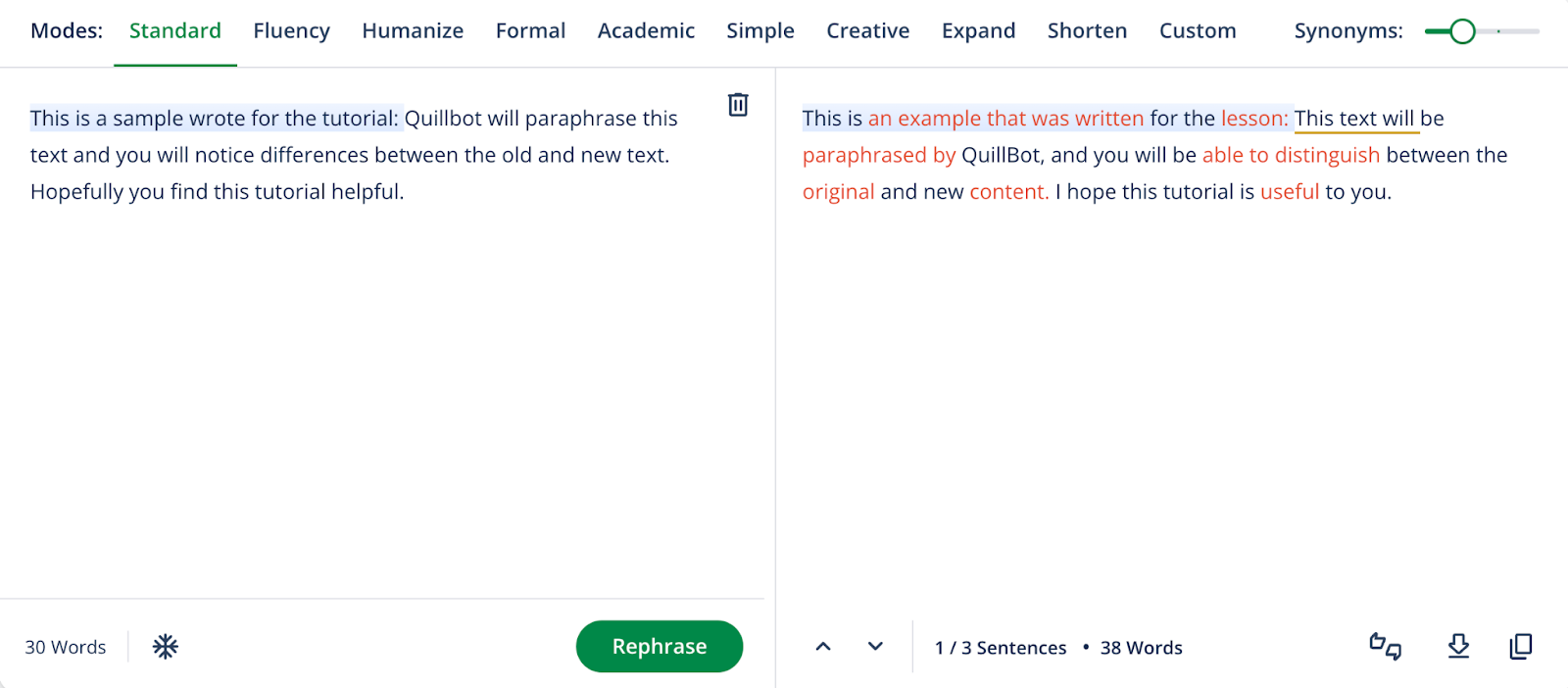
QuillBot provides writing tools that work with a supplied passage or document. In the Paraphraser, the original text and a rewritten version sit alongside one another, letting the writer compare the revision with the material that prompted it. The same service also has an add-in for working inside a document editor.
Choose the kind of revision
Paraphrasing modes determine the emphasis of the rewrite. Standard balances a change in expression with keeping the meaning, while Fluency concentrates on grammar and makes fewer word substitutions. Other modes target a formal or academic tone, simpler language, or a longer or shorter passage. Custom mode takes a brief instruction about the desired style.
Work through alternatives
A passage can be typed, pasted or supplied in a document. The revision can be compared with the original to see what changed and whether the intended meaning remains. Rephrase produces another variation when the first version is not the one the writer wants. The selected result can then be copied or downloaded for use in the draft.
Revise within a document
The Word add-in places the Paraphraser and Grammar Checker in a sidebar beside the document. A sentence can be rephrased or checked while the surrounding draft stays available for context, then incorporated into the document.
What can QuillBot do?
- 01
Revise a passage
Choose paraphrasing modes and check grammar or fluency
- 02
Summarize source text
Condense long passages into shorter working notes
- 03
Format citations
Prepare references for sources used in a document
- 04
Check for plagiarism
Inspect document text with the Premium checker
How do I get started with QuillBot?
- 1
Open the Paraphraser
Type or paste the source into the left text box, or upload a document
- 2
Choose a mode
Select the intended rewriting style and click Paraphrase
- 3
Review the alternative
Compare the highlighted changes and use Rephrase for another version if needed
- 4
Use the result
Copy the text or select Export to download it
What does QuillBot work with?
- Microsoft Word
- DOCX
- TXT
Who is QuillBot for?
- Academic essay writers
Turn source notes into a revised draft with formatted references
How much does QuillBot cost?
- Free plan · Limited paraphrasing and grammar checks, plus citation generation, AI detection and translation.
- or $8.33/mo billed yearlySave 58%
What are QuillBot's limitations?
Word add-in
An internet connection is required
Word for the web
Sign in to a Microsoft account before installing the QuillBot add-in
More tools like QuillBot
 Wordtune
Refine English drafts through alternate wording, tone and length
 Grammarly
Revise grammar, clarity and tone while you write
 Readwise
Keep reading highlights available for review and later writing
 DeepL
Translate business text and documents with consistent terminology
 Anyword
Compare marketing copy using audience and campaign performance signals
 Jenni
Write academic drafts with a research library and linked citations