
Surfer
Plan and revise search content using page and visibility analysis
What is Surfer?
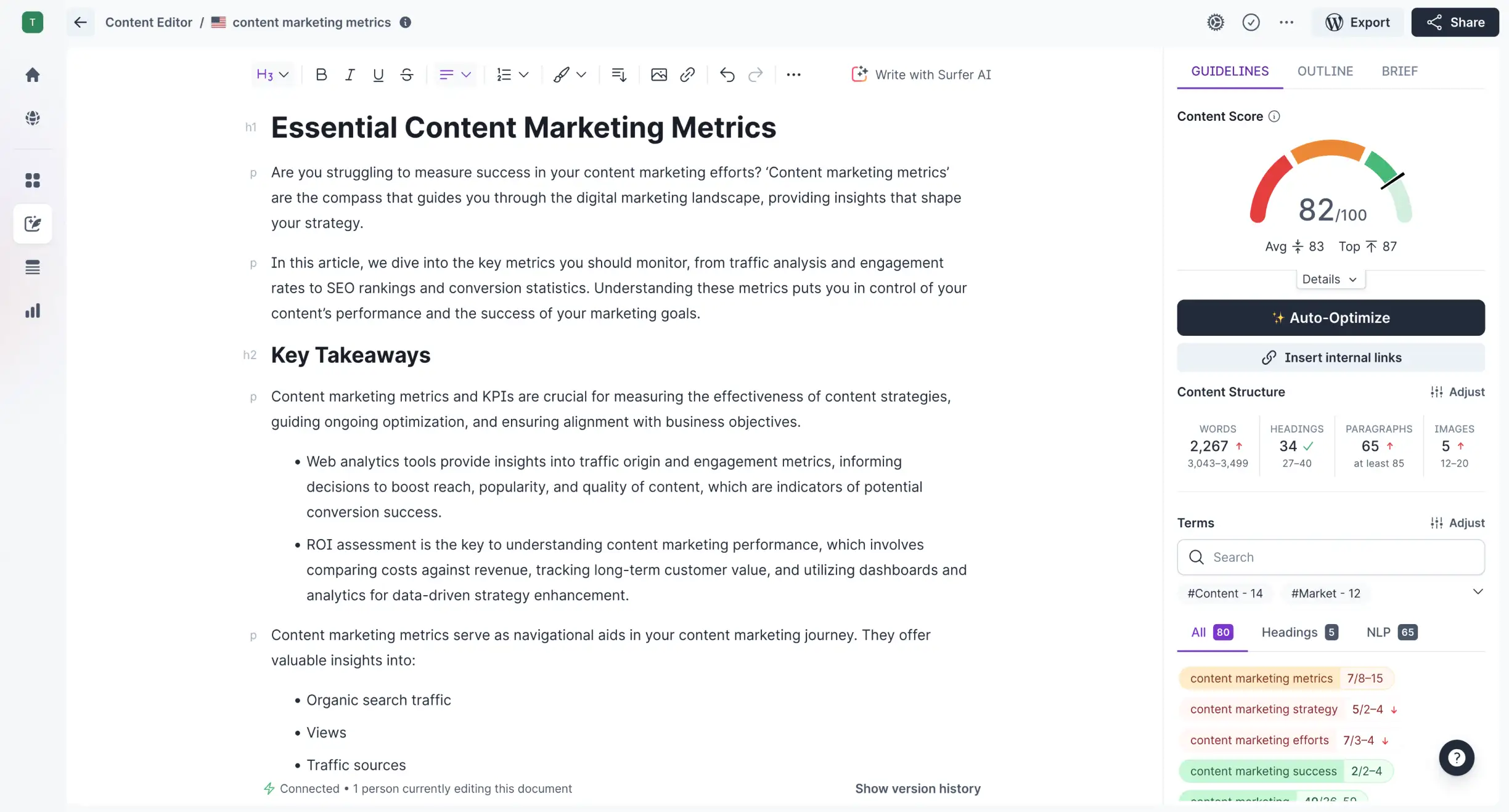
Surfer helps content and SEO teams plan, write and improve pages for search engines and AI answers. It combines visibility tracking with an editor, topic planning and page audits. A target keyword and market provide the context for comparing an article with competing results and deciding what to change.
Plan an article around a search topic
A keyword and target market establish the article's subject and competitive context. Use the research to build an outline with relevant headings and questions, then write the draft in Content Editor. The guidance gives an editor specific topics to address while Surfy helps revise passages as the argument takes shape.
Improve pages already on the site
Content audits identify published pages that need attention. An editor can use that information to update the material and improve its coverage, rather than starting a new article for every opportunity. Google Search Console context also helps identify relevant internal links, connecting a revised page to useful material elsewhere on the same site.
Check visibility in AI answers
AI visibility tracking follows whether a brand appears in answers to selected prompts and which sources those answers cite. Comparing topics and competitors helps the team see where its coverage is absent or weak. The resulting research can inform the next article or revision, linking content production to what searchers are asking and the sources answer engines use.
What can Surfer do?
- 01
Monitor AI mentions
Track brand citations in supported answer services
- 02
Audit site content
Identify pages with improvement opportunities
- 03
Outline an article
Prepare headings and questions for the target topic
- 04
Optimize a draft
Review writing guidance and refine passages with Surfy
- 05
Suggest internal links
Use Google Search Console context to find relevant pages on the site
How do I get started with Surfer?
- 1
Open Audit
Use a Surfer plan with Audit, then enter the page URL, target keyword and country or city
- 2
Review the comparison
Open the Gear icon and select the competitors relevant to the page
- 3
Use the report
Examine the recommendations and click Share if another editor needs the results
What does Surfer work with?
- ChatGPT
- Contentful
- Jasper
- Zapier
- Google Docs
- WordPress
- Web page URL
- WordPress
Who is Surfer for?
- SEO editors
Prioritize article refreshes and revise the selected pages
- Brand search analysts
Compare visibility in AI-generated answers
How much does Surfer cost?
- No free plan
- or $49/mo billed yearlySave 17%
What are Surfer's limitations?
Content Editor comparisons
Scoring needs at least three competitors from different domains among the top ten results
URL imports
Content is imported when a query is created; later CMS edits and Surfer changes do not sync
Surfer FAQ
Can I stop renewal?
Yes. Disable automatic renewal in billing; access continues through the paid period.