
SciSpace
Read scientific papers with explanations of passages, equations and tables
What is SciSpace?
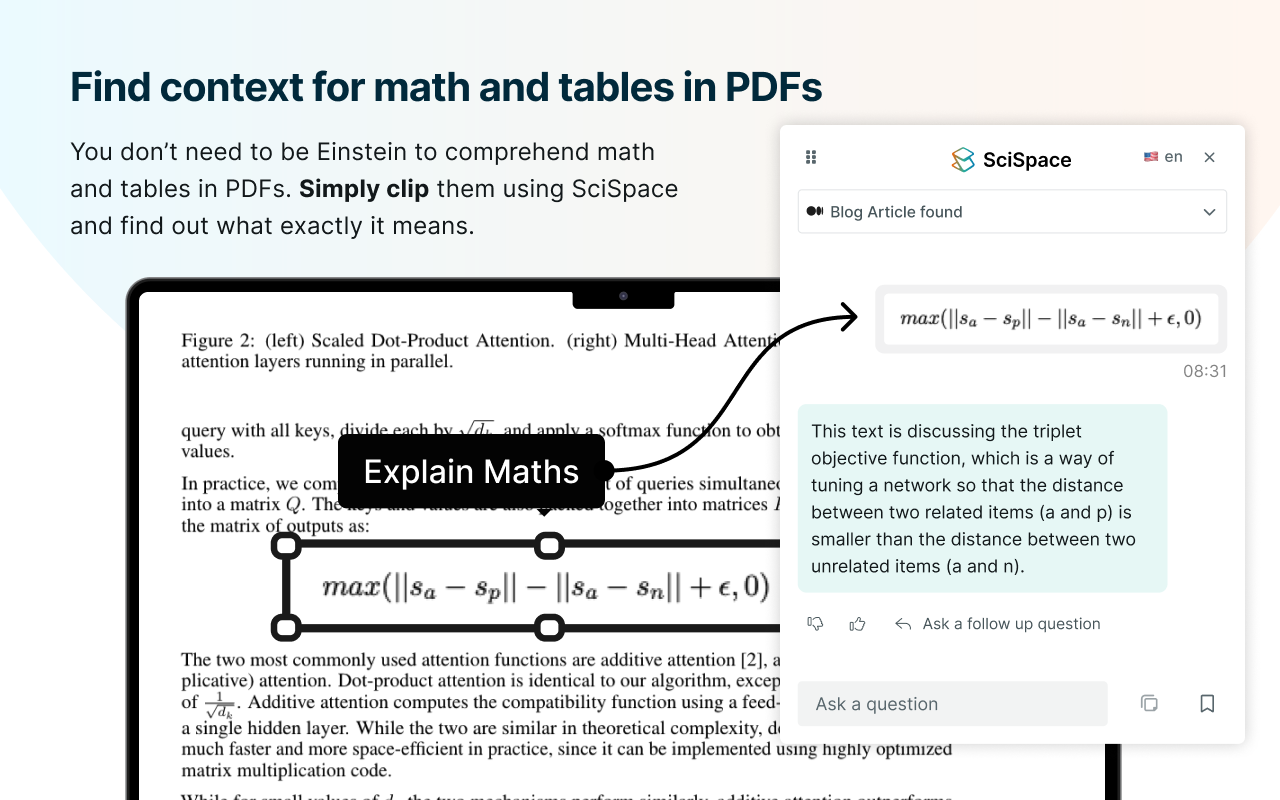
SciSpace is an AI research workspace for discovering literature and working through academic papers. Researchers can ask source-linked questions, clarify technical passages, equations and tables, and compare findings across documents. An uploaded PDF or saved paper collection provides the material for closer reading and extraction.
Find papers for a research question
Begin with the topic or question you are investigating and use literature discovery to find relevant publications. A collection can combine those discoveries with PDFs you already have. This gives a review a body of evidence to examine, rather than treating each uploaded document as an isolated reading task.
Read difficult passages with the paper beside you
Chat with PDF answers questions about a document and links the response to its source. A selected passage, equation or table can become the focus of an explanation, helping you work through the part of a study that is unclear. Notes retain the insights you want to use later while the paper remains available for closer reading.
Compare studies and prepare the next draft
Extract Data organizes selected information such as study methods and numerical findings across papers. The comparison helps identify how studies differ and what they report about the same question. Working notes and downloadable tables provide material for a review, while citation and writing tools support the next stage of preparing a referenced draft.
What can SciSpace do?
- 01
Discuss an uploaded PDF
Ask questions and request source-linked summaries
- 02
Explain technical passages
Clarify selected scientific language
- 03
Interpret equations and tables
Ask about clipped notation and tabular content
- 04
Find research literature
Discover and review publications
- 05
Prepare cited writing
Use paraphrasing and citation-generation tools
How do I get started with SciSpace?
- 1
Open a paper
Sign in to SciSpace, choose Chat with PDF, and use Upload PDF to select a document
- 2
Ask a focused question
Enter a question about the uploaded study in the chat box and read the response
- 3
Keep the findings
Highlight useful sections and choose Save To Notebook to store insights in topic folders
What does SciSpace work with?
- Zotero
- Mendeley
- Zotero
- CSV
- Excel
- BibTeX
- Zotero
- Mendeley
Who is SciSpace for?
- Scientific literature readers
Work through unfamiliar passages, methods and equations before using a paper
How much does SciSpace cost?
- Free plan · 100 credits per month.
- or $12/mo billed yearlySave 40%
What are SciSpace's limitations?
PDF size
Chat with PDF accepts files up to 100 MB
Scanned documents
Chat with PDF needs readable text; image-only scans require OCR first
Zotero import
Papers must have a DOI; items absent from the SciSpace database can still be skipped
SciSpace FAQ
Can I ask questions in other languages?
Yes. SciSpace supports multilingual interaction with research material.
More tools like SciSpace
 Elicit
Find studies and compare evidence for scientific research
 Harvey
Research legal questions and analyze matter documents for legal practices
 Gemini Notebook
Study and brief from a notebook of your own research sources
 You.com
Add web search, page extraction and cited research to AI applications
Usage-based pricing
 Scite
Inspect how later research supports or challenges a scientific finding
 Jenni
Write academic drafts with a research library and linked citations
 Humata
Ask focused questions across documents with references to the source text
 PDFgear
Edit, convert and ask questions about PDFs